Bug 1003658
| Summary: | Midori is not available as a choice of default browser in Gnome | ||
|---|---|---|---|
| Product: | [Fedora] Fedora | Reporter: | Randy Barlow <rbarlow> |
| Component: | midori | Assignee: | Kevin Fenzi <kevin> |
| Status: | CLOSED ERRATA | QA Contact: | Fedora Extras Quality Assurance <extras-qa> |
| Severity: | low | Docs Contact: | |
| Priority: | unspecified | ||
| Version: | 19 | CC: | a.panek, bnocera, control-center-maint, kalevlember, kevin, mkasik, ofourdan, rstrode, tiagomatos |
| Target Milestone: | --- | Keywords: | Reopened |
| Target Release: | --- | ||
| Hardware: | x86_64 | ||
| OS: | Linux | ||
| Whiteboard: | |||
| Fixed In Version: | midori-0.5.5-2.fc20 | Doc Type: | Bug Fix |
| Doc Text: | Story Points: | --- | |
| Clone Of: | Environment: | ||
| Last Closed: | 2013-11-09 03:35:16 UTC | Type: | Bug |
| Regression: | --- | Mount Type: | --- |
| Documentation: | --- | CRM: | |
| Verified Versions: | Category: | --- | |
| oVirt Team: | --- | RHEL 7.3 requirements from Atomic Host: | |
| Cloudforms Team: | --- | Target Upstream Version: | |
| Embargoed: | |||
|
Description
Randy Barlow
2013-09-02 14:59:33 UTC
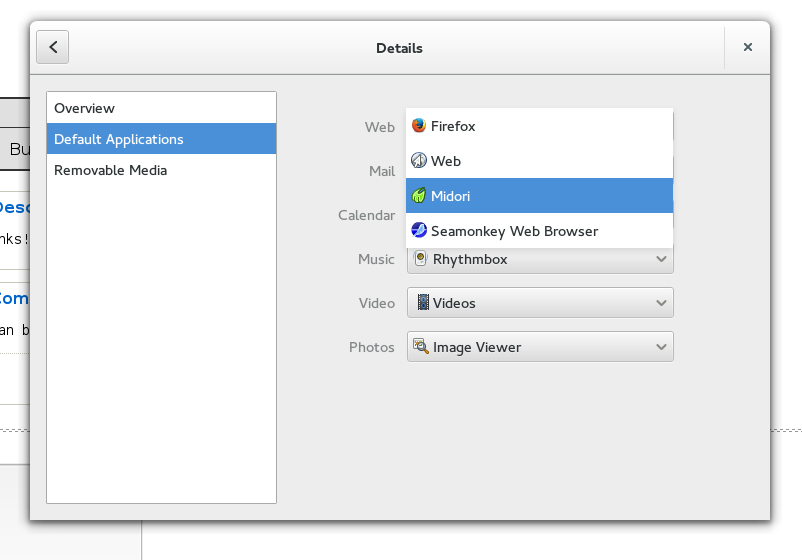
Moving this over to control-center as I think thats where this can be set. On my F20 installation, Midori shows up fine in the gnome-control-center browser selection dialog: http://kalev.fedorapeople.org/g-c-c-browser-selection-midori.png It doesn't work for me in F19. After a fresh install and installing Midori the settings dialog only gives me Firefox as option. (In reply to Kevin Fenzi from comment #1) > Moving this over to control-center as I think thats where this can be set. Hasn't for 3 years: http://www.hadess.net/2010_10_01_archive.html Does midori have "x-scheme-handler/http" and "x-scheme-handler/https" as mime-types it can handle? Not a control-center bug anyway. Yes, it does have those. I have no idea what the process beyond that is or where I could change anything in midori. Thank you Bastien for the link. It led me to a solution (albeit not a "good" one): sudo vim /usr/share/applications/defaults.list -> %s/firefox/midori/g A midori.desktop file is available and it has almost the same mimetype list as Firefox has - besides XUL. (In reply to Kevin Fenzi from comment #5) > Yes, it does have those. I have no idea what the process beyond that is or > where I could change anything in midori. Running update-desktop-database in %post so that the mime-types are actually installed, to start with. Cool. Thanks for politely pointing out that bug... updates on the way. midori-0.5.5-2.fc20 has been submitted as an update for Fedora 20. https://admin.fedoraproject.org/updates/midori-0.5.5-2.fc20 midori-0.5.5-2.fc19 has been submitted as an update for Fedora 19. https://admin.fedoraproject.org/updates/midori-0.5.5-2.fc19 Package midori-0.5.5-2.fc19: * should fix your issue, * was pushed to the Fedora 19 testing repository, * should be available at your local mirror within two days. Update it with: # su -c 'yum update --enablerepo=updates-testing midori-0.5.5-2.fc19' as soon as you are able to. Please go to the following url: https://admin.fedoraproject.org/updates/FEDORA-2013-20788/midori-0.5.5-2.fc19 then log in and leave karma (feedback). Karma increased - thanks! Works for me now - left karma! midori-0.5.5-2.fc19 has been pushed to the Fedora 19 stable repository. If problems still persist, please make note of it in this bug report. midori-0.5.5-2.fc20 has been pushed to the Fedora 20 stable repository. If problems still persist, please make note of it in this bug report. |