Bug 1533818
| Summary: | Route creating settings can not get to the weight percentage bar again after switch to integers editing input boxes | ||
|---|---|---|---|
| Product: | OpenShift Container Platform | Reporter: | XiaochuanWang <xiaocwan> |
| Component: | Management Console | Assignee: | Jon Jackson <jonjacks> |
| Status: | CLOSED CURRENTRELEASE | QA Contact: | Yadan Pei <yapei> |
| Severity: | low | Docs Contact: | |
| Priority: | medium | ||
| Version: | 3.9.0 | CC: | aos-bugs, jokerman, mmccomas, spadgett |
| Target Milestone: | --- | ||
| Target Release: | 3.9.0 | ||
| Hardware: | Unspecified | ||
| OS: | Unspecified | ||
| Whiteboard: | |||
| Fixed In Version: | Doc Type: | Bug Fix | |
| Doc Text: |
Cause: No option was provided to enable the service weight percentage slider after the "edit weights as integers" option was selected on the "Create Route" page.
Consequence: Once editing service weights as integers, the user could not switch back to using the percentage slider.
Fix: Added a button which allows the user to re-enable the percentage slider, as long as there is only one alternate service.
Result: User can now switch back and forth between editing service weights as integers or a percentage slider.
|
Story Points: | --- |
| Clone Of: | Environment: | ||
| Last Closed: | 2018-01-29 12:46:39 UTC | Type: | Bug |
| Regression: | --- | Mount Type: | --- |
| Documentation: | --- | CRM: | |
| Verified Versions: | Category: | --- | |
| oVirt Team: | --- | RHEL 7.3 requirements from Atomic Host: | |
| Cloudforms Team: | --- | Target Upstream Version: | |
| Embargoed: | |||
|
Description
XiaochuanWang
2018-01-12 10:01:24 UTC
Commit pushed to master at https://github.com/openshift/origin-web-console https://github.com/openshift/origin-web-console/commit/2f87aedc9e617e3b41bf953f90e2863abd1f4e44 Merge pull request #2656 from TheRealJon/bug-1533818 Automatic merge from submit-queue. Add link to re-enable percentage slider when editing service weights on the create route page A link now appears next to the alternate service action links to re-enable the slider once it is disabled. Fixes [Bugzilla Bug 1533818](https://bugzilla.redhat.com/show_bug.cgi?id=1533818) 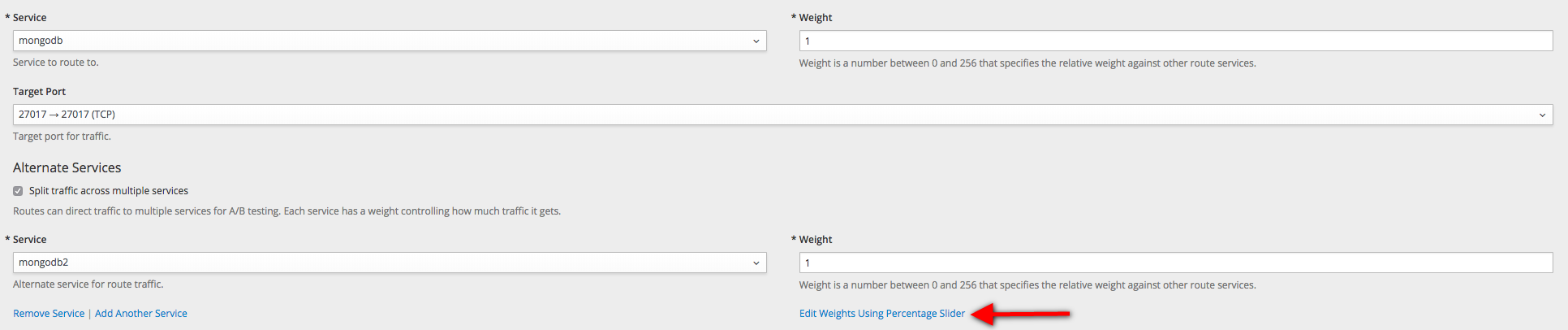 Verified on: OpenShift Master: v3.9.0-0.31.0 OpenShift Web Console: v3.9.0-0.31.0.0 The "Edit Weights Using Percentage Slider" works for balancing weight of services. |
)