Fedora Account System
Red Hat Associate
Red Hat Customer
Created attachment 1850130 [details]
CRD status does not update, even after successfully deploying.

Description of problem:

After deploying software with ACM to managed clusters (installing Kyverno software in this case), CRD objects show as "Not Deployed" in ACM web console, even though the deployment seems to have succeeded.  Using an Application/Subscription object to deploy, and source is in a local enterprise github instance.

I only see this on CRD objects (CustomResourceDefinition), and this persists after applying Subscription-admin, as per
   https://access.redhat.com/solutions/6010251
using the policy at
   https://github.com/open-cluster-management/policy-collection/blob/main/community/CM-Configuration-Management/policy-configure-subscription-admin-hub.yaml

I can recreate this problem with any CRD, there does not appear to be anything special about the CRDs I am deploying.  Should be very easy to replicate.


Version-Release number of selected component (if applicable):
ACM 2.4.0

How reproducible:
Deploy an Application to a managed cluster, make sure this application includes a CRD (CustomResourceDefinition).  Since a CRD is not contained in the subscription namespace, you have to apply subscription-admin role as per https://access.redhat.com/solutions/6010251

Actual results:
CRD objects in ACM web console remain with status "Not Deployed"

Expected results:
CRD objects, once deployed, should show correct status.
G2Bsync 1013460767 comment
 chenz4027 Fri, 14 Jan 2022 20:43:20 UTC
 G2Bsync release 2.4.2 will contain the fix.
Waiting for 2.4.2-rc3 to verifiy
Tested and verified on cluster `alc-auto` ACM - `2.4.2-RC3` OCP - `4.8.2` 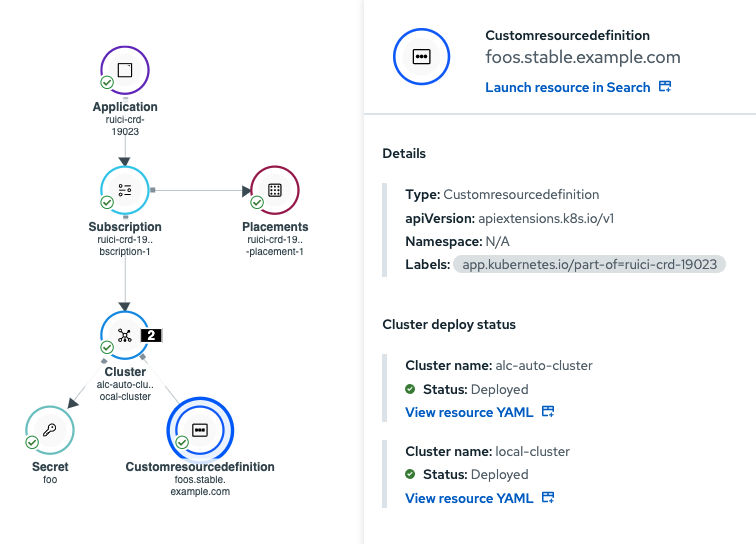
https://polarion.engineering.redhat.com/polarion/#/project/RHACM4K/workitem?id=RHACM4K-10668
test case added
Since the problem described in this bug report should be
resolved in a recent advisory, it has been closed with a
resolution of ERRATA.

For information on the advisory (Important: Red Hat Advanced Cluster Management 2.4.2 security updates and bug fixes), and where to find the updated
files, follow the link below.

If the solution does not work for you, open a new bug report.

https://access.redhat.com/errata/RHSA-2022:0735